
Table of Contents
- AI should not try to solve everything
- What can AI actually do on WhatsApp?
- The key is designing when AI responds and when a person steps in
- 1. AI resolves it on its own
- 2. AI helps, but a person decides
- 3. The conversation goes directly to a person
- Handing over is not enough: you need to pass the context
- The bot does not have to pretend to be human
- How do you avoid robotic responses?
- Having context also makes the conversation more human
- What happens if AI does not know the answer?
- How does WhatsApp automation work behind the scenes?
- If it can resolve the request:
- If confirmation is needed:
- If the case is sensitive:
- An example: sales support
- Another example: support
- What happens outside business hours?
- What mistakes should we avoid?
- Automating too much
- Not offering an exit
- Asking too many questions
- Repeating information
- Inventing answers
- Talking too much
- How do you know which conversations to automate first?
- Do you need to start with a huge AI agent?
- How do we know whether the automation is working?
- Frequently Asked Questions
- Can WhatsApp be connected to Artificial Intelligence?
- Can AI answer questions using CRM information?
- Can a bot conversation be handed over to a person?
- Can AI respond 24 hours a day?
- Should every conversation be automated?
- Automating WhatsApp should not make a company feel less human
We have all had a conversation like this at some point:
Hi, I need help with an invoice.
Bot: Select an option.
My problem is not listed.
Bot: Select an option.
I want to talk to a person.
Bot: I did not understand your request.
And that is where the problem appears. Automating WhatsApp is not a bad idea. But poor automation can turn a channel that should be fast and personal into a frustrating experience. The good news is that today you do not have to choose between: automation or human support. A well-designed solution can use Artificial Intelligence to resolve simple questions, retrieve information, classify conversations, and assist the team. And when the situation requires it: hand the conversation over to a person with all the available context. That balance is probably the most important part of automating WhatsApp correctly.
AI should not try to solve everything
One of the most common mistakes is approaching the project like this:
“We want the bot to answer absolutely everything.”
It sounds logical. If we are automating, the more AI does, the better. But not necessarily. There are conversations where automation works very well. For example:
- checking an order status;
- checking opening hours;
- getting information about a service;
- requesting specific information;
- checking an outstanding balance;
- booking an appointment;
- sending documentation;
- answering frequently asked questions.
But there are others where we probably want a person. For example:
- an angry customer;
- a sales negotiation;
- an exceptional situation;
- a sensitive complaint;
- a question the AI does not understand;
- an important customer who needs personalized attention.
Automation should not be measured by: “How many conversations did we prevent a person from seeing?” But by: “How many conversations did we resolve well?”
What can AI actually do on WhatsApp?
Much more than display a menu of options. A traditional chatbot usually depends on rigid flows:
Press 1 for sales.
Press 2 for support.
Press 3 for administration.
With AI, we can enable more natural conversations. For example:
“Hi, I paid yesterday but I still have an outstanding balance.”
AI can interpret that we are talking about:
- a payment;
- a possible missing payment confirmation;
- a customer who needs administrative support.
From there it can:
- identify the customer;
- query the system;
- verify the payment status;
- respond if there is enough information;
- hand the case over to administration if it finds an inconsistency.
The user did not have to learn the bot's menu. They simply explained the problem.
The key is designing when AI responds and when a person steps in
Not every conversation should follow the same path. We can think in three levels.
1. AI resolves it on its own
For simple, low-risk situations. For example:
“What time do you open?”
“What is my order number?”
“Can you send me the invoice again?”
If we have the necessary data, the response can be automatic.
2. AI helps, but a person decides
Imagine a potential customer asks:
“We need to develop a platform for our company and would like an estimate.”
AI can:
- request initial information;
- understand the need;
- organize the requirements;
- classify the opportunity;
- prepare a summary.
But we may not want it to provide a quote automatically. It can say:
“Great. I have the main information. I’ll connect you with someone from the team to review the scope.”
Automation did a large part of the work. Without trying to replace a conversation where commercial judgment matters.
3. The conversation goes directly to a person
There are situations where it is not even worth insisting. For example:
“I’m really upset. Nobody has solved this for three days.”
At that point, continuing to ask automated questions can make the experience worse. Good automation should be able to detect certain signals and say:
“I understand. I’ll hand your case over to someone on the team so they can review it.”
That is also good automation.
Handing over is not enough: you need to pass the context
Imagine this conversation. Customer:
“I did not receive my order.”
AI asks for:
- name;
- order number;
- email;
- date;
- address.
Then it discovers a problem and hands the case over to the team. A person joins the conversation and asks:
“Hi. Can you send me your order number?”
All the previous work was lost. And for the customer, the experience is still poor. When a conversation moves to a person, the team should receive:
- who the customer is;
- what they asked;
- what information they already provided;
- what AI already checked;
- what the problem appears to be;
- why the case was handed over.
For example:
Summary: customer is asking about order #1842. It was due yesterday. The order appears as shipped, but there is no delivery confirmation. Name, address, and phone number have already been validated.
Now the person can join by saying:
“Hi Martin, I’ve been reviewing what happened with your order #1842.”
The difference is huge. Automation disappears from the experience. It does not feel like: bot → new person → start again. It feels like one conversation.
The bot does not have to pretend to be human
Another common mistake is trying to hide the fact that automation exists. There is no need. A message like:
“Hi, I’m the company’s virtual assistant. I can help you with orders, billing, and general questions. If needed, I can also connect you with the team.”
is perfectly reasonable. The problem is not that users know they are talking to AI. The problem appears when it:
- does not understand what they say;
- responds with irrelevant information;
- does not let them exit the flow;
- invents information;
- blocks access to a person.
Transparency builds more trust than artificially trying to imitate a human.
How do you avoid robotic responses?
Connecting an AI model is not enough. You also need to design how it should communicate. A company can define:
- tone;
- level of formality;
- response length;
- words to avoid;
- how to address customers;
- greeting style;
- when to use emojis;
- how to request information;
- what it should never claim.
For example, this is not the same:
“Your request has been successfully registered. Please wait for a response.”
as:
“Great, I’ve registered your request. The team will review it and we’ll write back as soon as we have an update.”
The information is practically the same. The experience is not.
Having context also makes the conversation more human
One of the things that breaks a conversation most is having to repeat information. If the system can identify the customer, AI could know:
- name;
- orders;
- booked appointment;
- contracted service;
- last conversation;
- assigned salesperson;
- request status.
So instead of asking:
“How can we help you?”
it could say:
“Hi John. I can see you have an order pending delivery. Is your question about that?”
As long as the integration and permissions are designed correctly. A sense of closeness does not come only from tone. It also comes from remembering context.
What happens if AI does not know the answer?
It should be able to admit it. That sounds obvious, but it is essential. Poor automation tries to answer anyway. Good automation can say:
“I don’t have enough information to confirm that. I’ll hand this over to the team so they can review it.”
That is preferable to generating an incorrect answer. That is why we need to define situations where the system:
- responds;
- asks for more information;
- queries another source;
- hands over;
- does not respond.
AI does not need to know everything. It needs to know what to do when it does not know.
How does WhatsApp automation work behind the scenes?
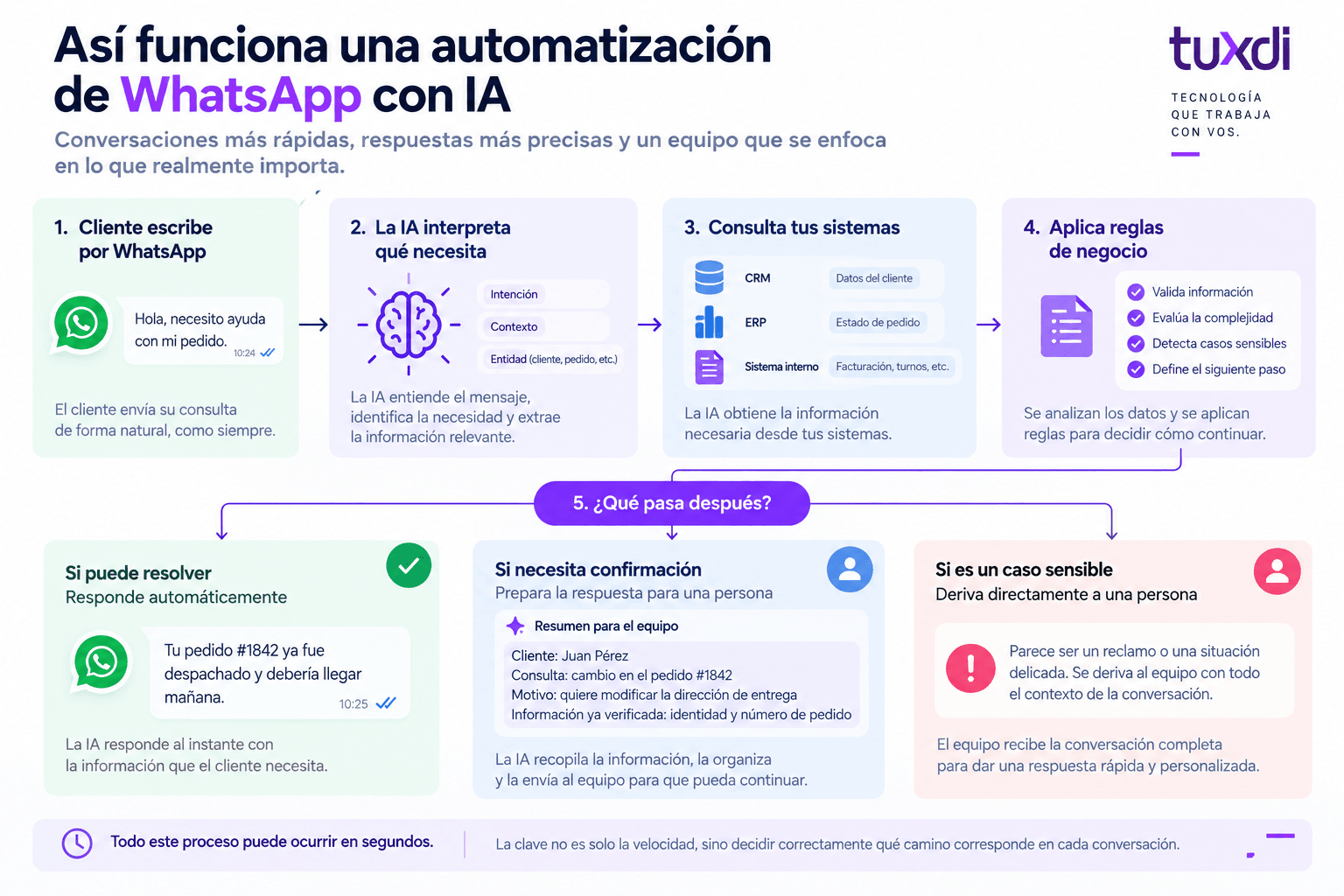
A flow could look like this: Customer writes on WhatsApp ↓ AI interprets what they need ↓ Queries CRM / ERP / internal system ↓ Applies rules ↓
If it can resolve the request:
it responds automatically.
If confirmation is needed:
it prepares the response for a person.
If the case is sensitive:
it hands it over directly. All of this can happen in seconds. But the important part is not speed. It is deciding correctly which path should be followed.
An example: sales support
Imagine someone writes:
“Hi, I’d like to know how much it costs to develop an app.”
AI could respond:
“Hi! To guide you better, I need to understand a little more about what you want to build. Would the app be for customers, internal use, or both?”
Then it can ask:
- what problem they want to solve;
- who will use it;
- which features they imagine;
- whether an existing system already exists;
- when they need to implement it.
Once the information has been collected: it should not necessarily send a quote. It can automatically create an opportunity in the CRM and hand over the conversation. The salesperson receives:
Company: ACME
Need: app for distributors
Estimated users: 300
Main features: orders, inventory, and payments
Desired timeframe: 4 months
The salesperson joins with context. AI did not replace the sale. It removed the repetitive part before the sale.
Another example: support
Customer:
“I can’t log in to my account.”
AI asks:
“Do you see an error message?”
Customer:
“It says my user is locked.”
The system can:
- identify the user;
- query their status;
- verify that the account is actually locked;
- execute an allowed procedure or send instructions;
- hand over if there is an exceptional situation.
For a simple request, the customer gets an immediate solution. The support team did not need to intervene. And if the problem is more complex, they receive an already diagnosed case.
What happens outside business hours?
This is one of the cases where automation adds a lot of value. A customer may write at 11:30 p.m. That does not mean we need a team working 24 hours a day. AI can:
- answer simple questions;
- collect information;
- report the status of an operation;
- register a request;
- classify the case;
- prepare the context.
And clearly say:
“The team will be available again tomorrow at 9:00 a.m. I’ve already registered your case so they can continue from here.”
We are not pretending human support is available. We are preventing the customer from being left without any response.
What mistakes should we avoid?
There are several common ones.
Automating too much
Trying to make AI resolve situations where a person should step in.
Not offering an exit
Users should be able to ask to speak with someone.
Asking too many questions
If the bot needs twelve messages to provide a simple answer, the flow is poorly designed.
Repeating information
If the customer already provided their order number, we should not ask for it again.
Inventing answers
When there is not enough information, the case should be handed over.
Talking too much
WhatsApp is a fast channel. An automated response that is six paragraphs long is probably not a good experience.
How do you know which conversations to automate first?
We can start by reviewing the questions the team currently receives. Which ones appear every day? For example:
- “Where is my order?”
- “Can you send me the invoice?”
- “How much does it cost?”
- “Do you have stock?”
- “What are your opening hours?”
- “How can I pay?”
- “I want to change my appointment.”
If the same question appears hundreds of times and the answer always comes from the same place, it is probably a good candidate. Then we can look at more complex conversations. The goal does not have to be automating 100%. Correctly automating 40% may already completely change the team’s operational workload.
Do you need to start with a huge AI agent?
No. In fact, it is probably better to start with a limited flow. For example: Phase 1 Resolve three types of frequent questions. Phase 2 Connect the CRM. Phase 3 Add intelligent classification and handoff. Phase 4 Automate specific actions. This makes it possible to measure:
- how many conversations it resolves;
- how many it hands over;
- where it makes mistakes;
- what users actually ask;
- how much time it saves.
Then it can be expanded.
How do we know whether the automation is working?
Not only by looking at how many messages AI answers. Some useful metrics may include:
- percentage of resolved requests;
- percentage of handoffs;
- average response time;
- time to resolution;
- number of human interventions;
- customer satisfaction;
- abandoned conversations;
- number of errors;
- time saved for the team.
Because a bot that automatically answers 90% of conversations but irritates every customer is not good automation.
Frequently Asked Questions
Can WhatsApp be connected to Artificial Intelligence?
Yes. Through WhatsApp Business Platform and the right integration, it is possible to add AI, automation, and connections to other business systems.
Can AI answer questions using CRM information?
Yes, as long as an integration exists and permissions and accessible information are correctly defined.
Can a bot conversation be handed over to a person?
Yes. And it is a fundamental part of a good implementation. Ideally, the person should also receive the previous context.
Can AI respond 24 hours a day?
It can resolve certain types of questions outside business hours, although it is important to make clear when human support is available.
Should every conversation be automated?
No. Some requests are better candidates than others. The goal should be to automate those where it genuinely improves the experience or reduces repetitive work.
Automating WhatsApp should not make a company feel less human
Good automation does not try to remove people from every conversation. It aims to make sure they appear where they are really needed. AI can resolve:
“Where is my order?”
so that a person has time to properly handle:
“I need help because we had an important problem with the service.”
That is the balance. Technology can handle repetitive work. It can collect information. It can query systems. It can respond immediately. It can prepare context. And when the conversation requires empathy, negotiation, or judgment: the person steps in. At Tuxdi, we design WhatsApp automations around that point where Artificial Intelligence, processes, and human support meet. If your team receives the same WhatsApp questions every day, we can analyze which ones could be resolved automatically, which should remain in human hands, and how to connect both without breaking the customer experience.